Hazard Reporting Platform
client
Con Edison
year
'24
timeframe
6 Months
The Problem
Con Edison’s hazard reporting was slow, fragmented, and high risk. Field employees often waited 30–90+ minutes on a hotline to report hazards, delaying response and creating inconsistent reporting across six operational divisions.
Early interviews with field employees, control-center admins, and stakeholders surfaced the same pattern: critical details were often lost or captured inconsistently, workflows varied by division, and supervisors lacked real-time visibility into active hazards. Previous digital tools had also struggled with adoption, creating a real rollout risk.
These gaps carried significant operational and financial risk, with individual incidents exposing the company to $250K+ per unreported incident. Any solution also had to meet strict safety and compliance requirements, including 911 protocols for gas-related hazards.
That led to a clear design strategy: Make hazard reporting effortless in the field while giving operational teams the visibility and control they needed at scale.
Impact
Beyond metrics, this project transformed hazard reporting from a slow, fragmented hotline into a unified, digital-first platform—shifting both workflow and culture.
~$250K+Potential cost avoided per incident through faster hazard reporting | ||
45 secondsAverage reporting time (down from 30–90+ minutes) | ||
85–90%Adoption across six operational divisions within the first two weeks |
My Role
As Design Lead, I owned product strategy, UX, and adoption from discovery through enterprise rollout.
I partnered with product, engineering, operations, compliance, and training teams to define the workflow, resolve system constraints, and support adoption across six business units.
My role included designing the mobile reporting experience and admin dashboard, facilitating cross-functional alignment, shaping rollout strategy, and contributing reusable patterns back to the enterprise design system.
Key Design Decisions
Mobile-First Reporting
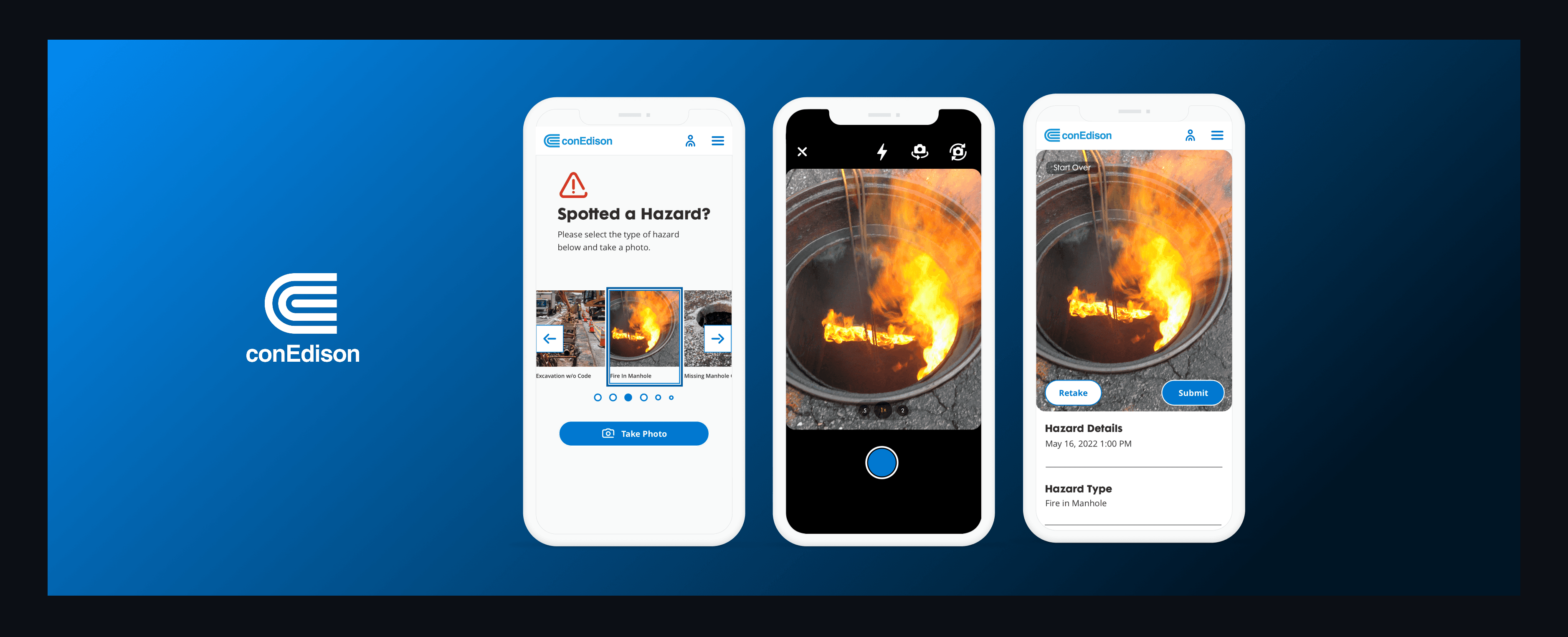
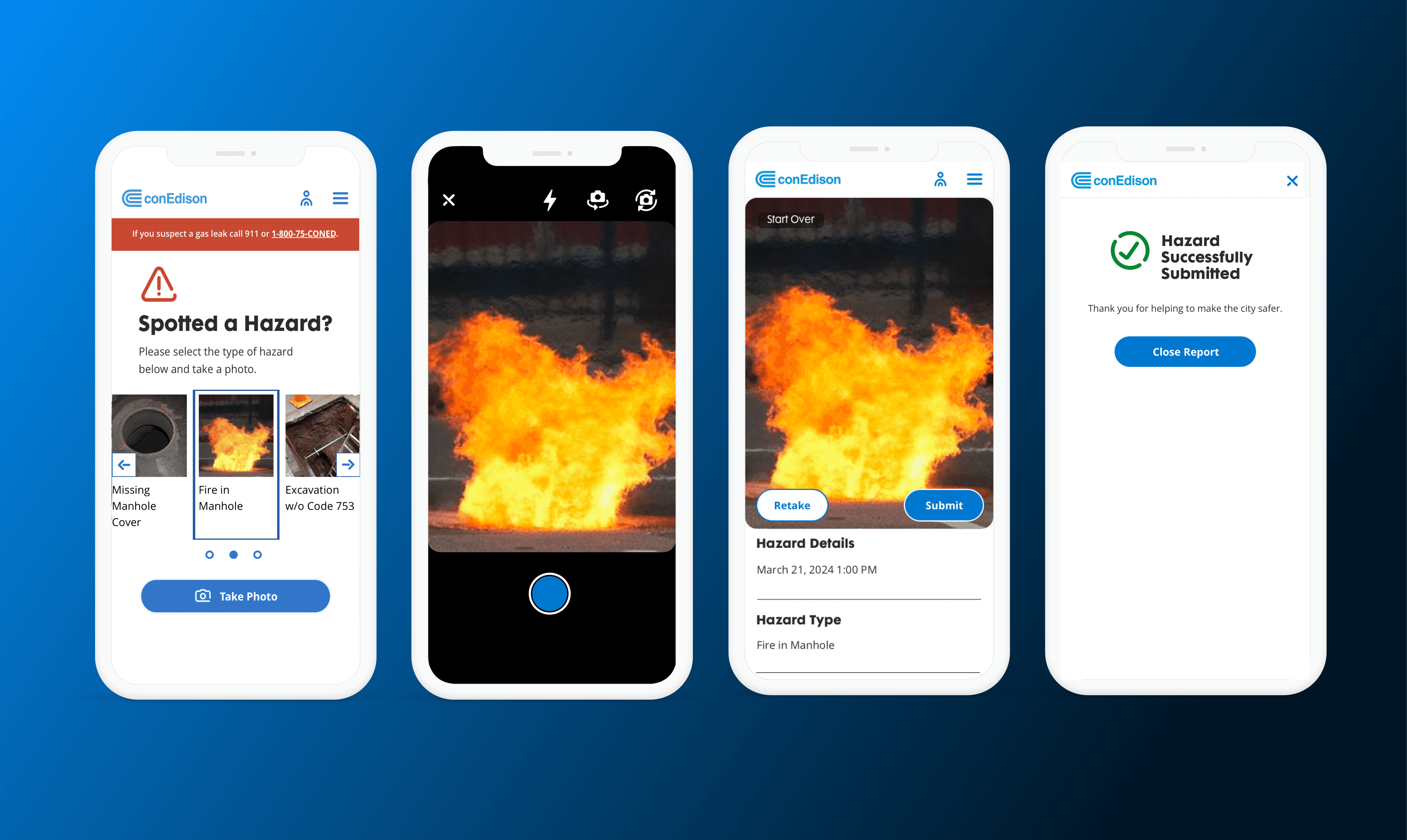
I designed a mobile-first reporting workflow—enable GPS → select hazard type → snap a photo → submit—so that hazard reports automatically routed to the correct team, eliminating manual entry and cutting reporting time from 30–90+ minutes to under a minute.
Centralized Admin Dashboard
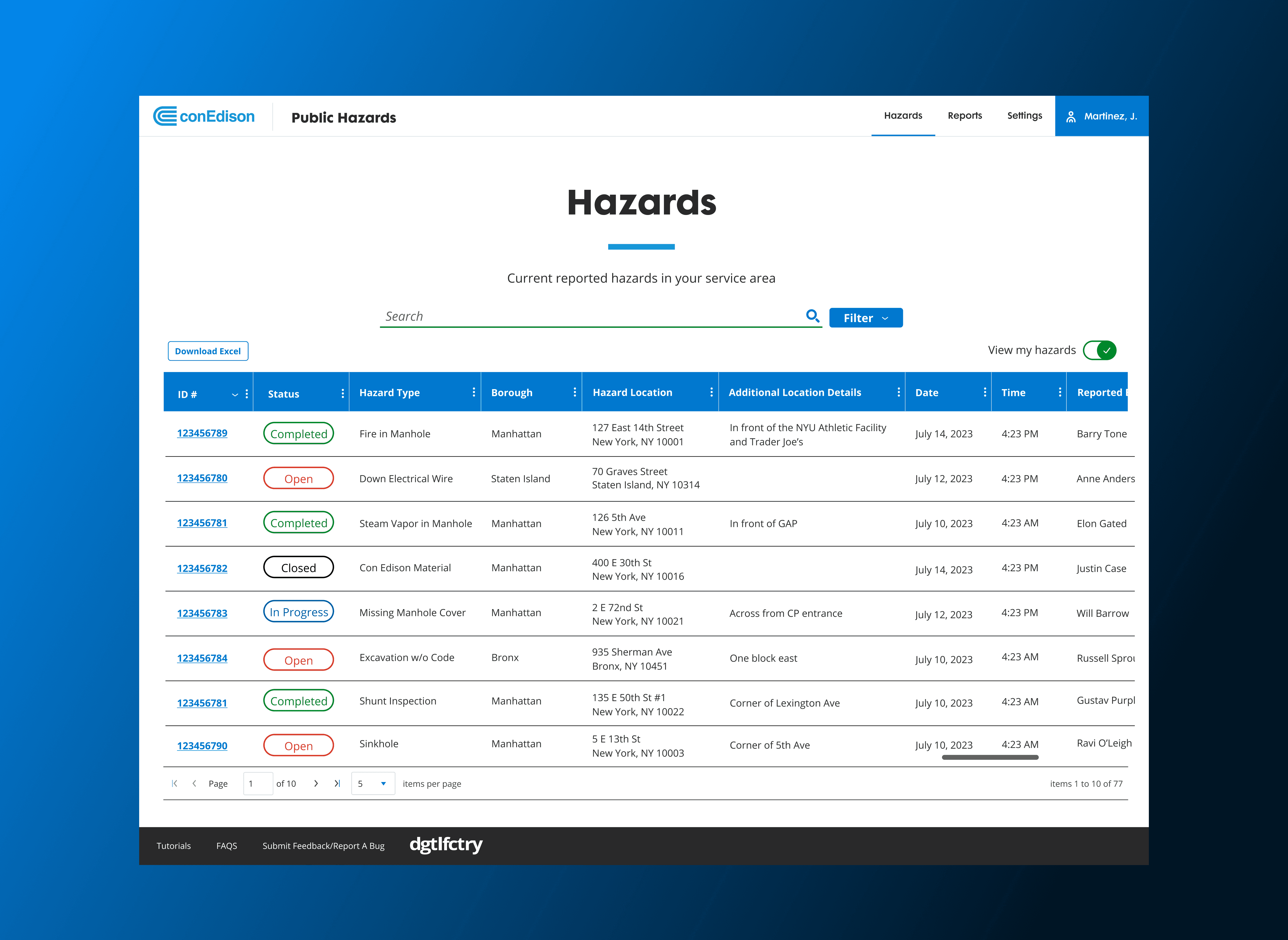
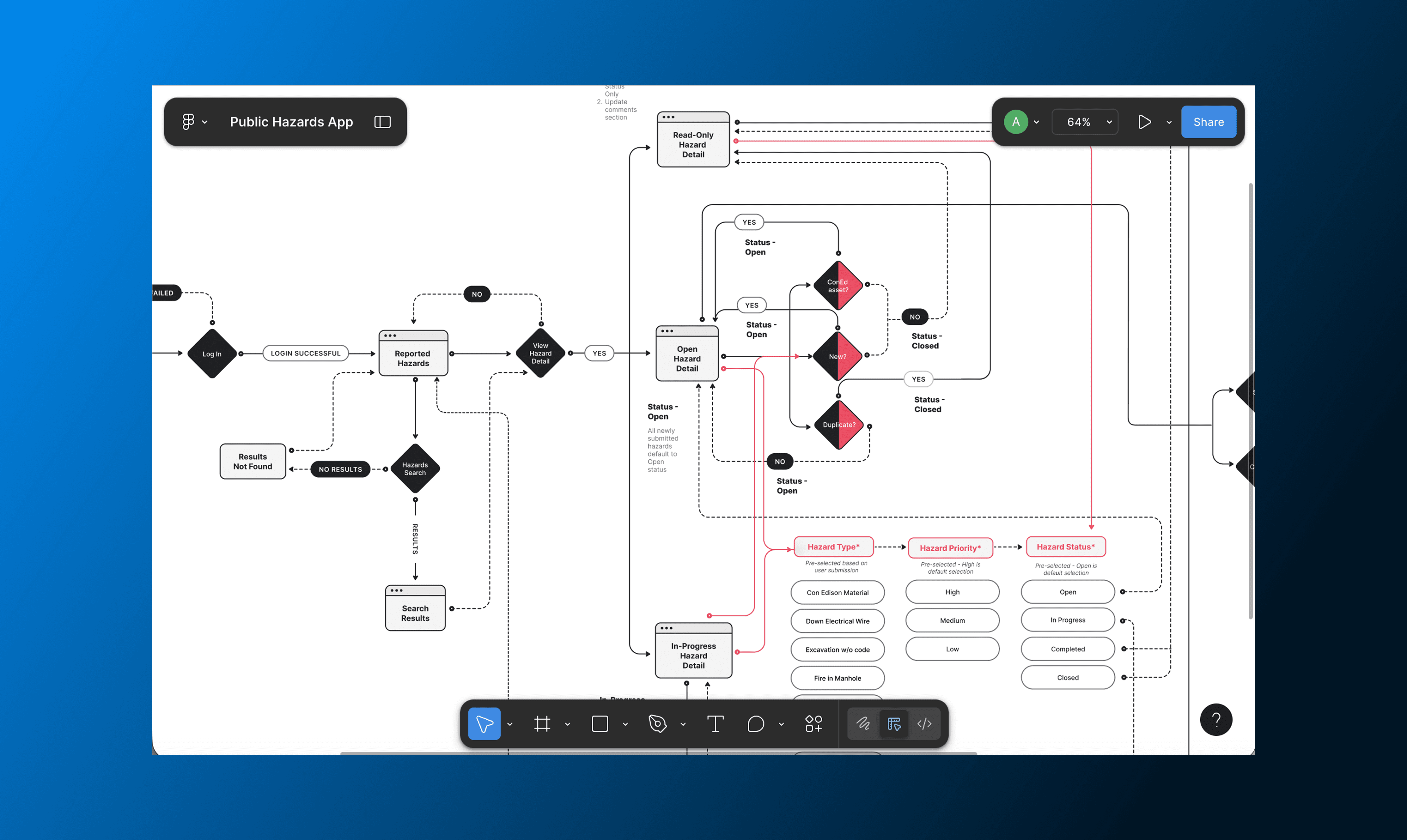
I designed a role-based admin dashboard spanning six operational divisions, giving leaders real-time visibility, filtering, and instant notifications. To ensure the solution met operational needs, I partnered closely with Product to define requirements, facilitated alignment workshops with stakeholders from each division, and worked hand-in-hand with Engineering to refine interactions and enforce system constraints. This cross-functional approach unified previously siloed workflows, enabled proactive risk management, and established a scalable governance model for future internal tools.
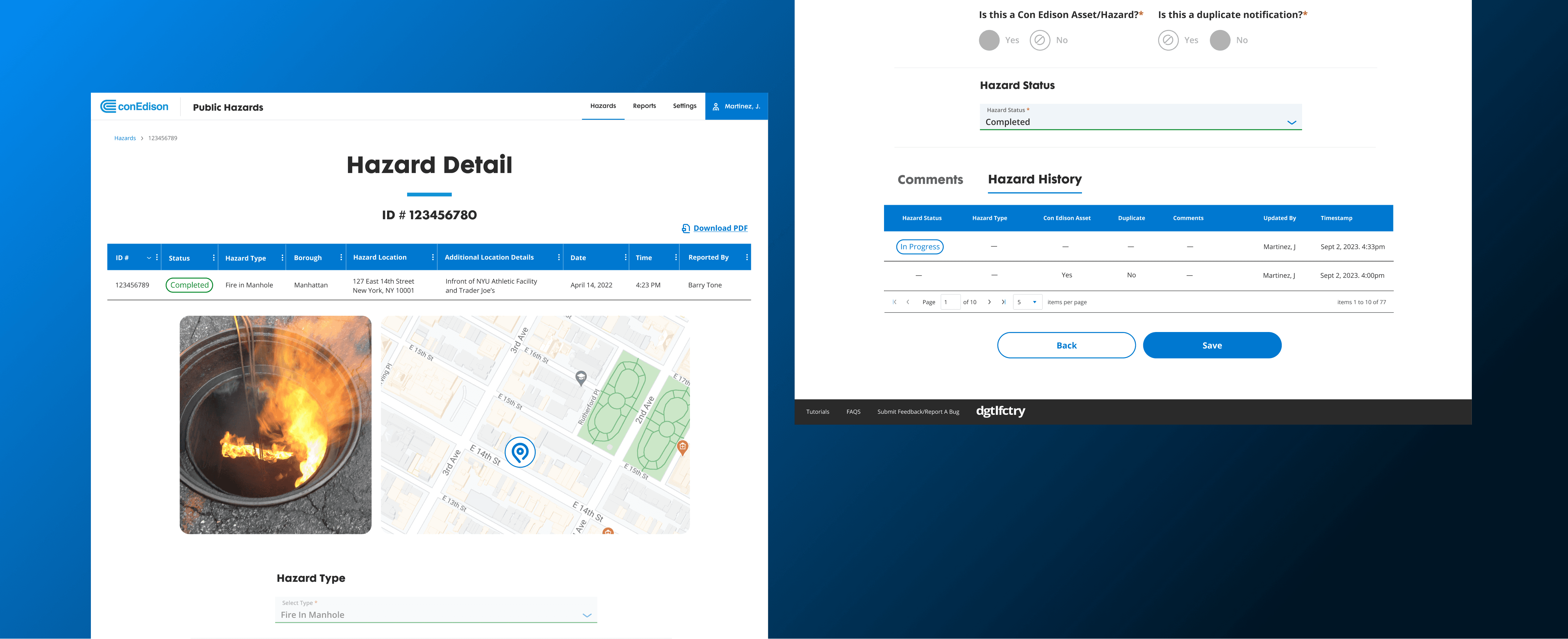
Turning an Access Dispute into a Governance Model
Disagreements around admin access stalled development for weeks. I facilitated a working session with product and engineering leads to align on constraints and explore access models. We landed on a configurable dashboard system that allowed admins to filter hazards and toggle visibility by borough or operational group, unblocking delivery and establishing a governance standard for future internal tools.
Designing Around Critical Constraints
Location Enforcement
UAT testing revealed users could bypass location permissions, introducing risk. Partnering with Product and Engineering, I redesigned the end-to-end permission flow with platform-specific instructions and clear microcopy, implementing hard blocks that prevented submission until GPS was enabled. This ensured every report included accurate location data, improving routing and response time.
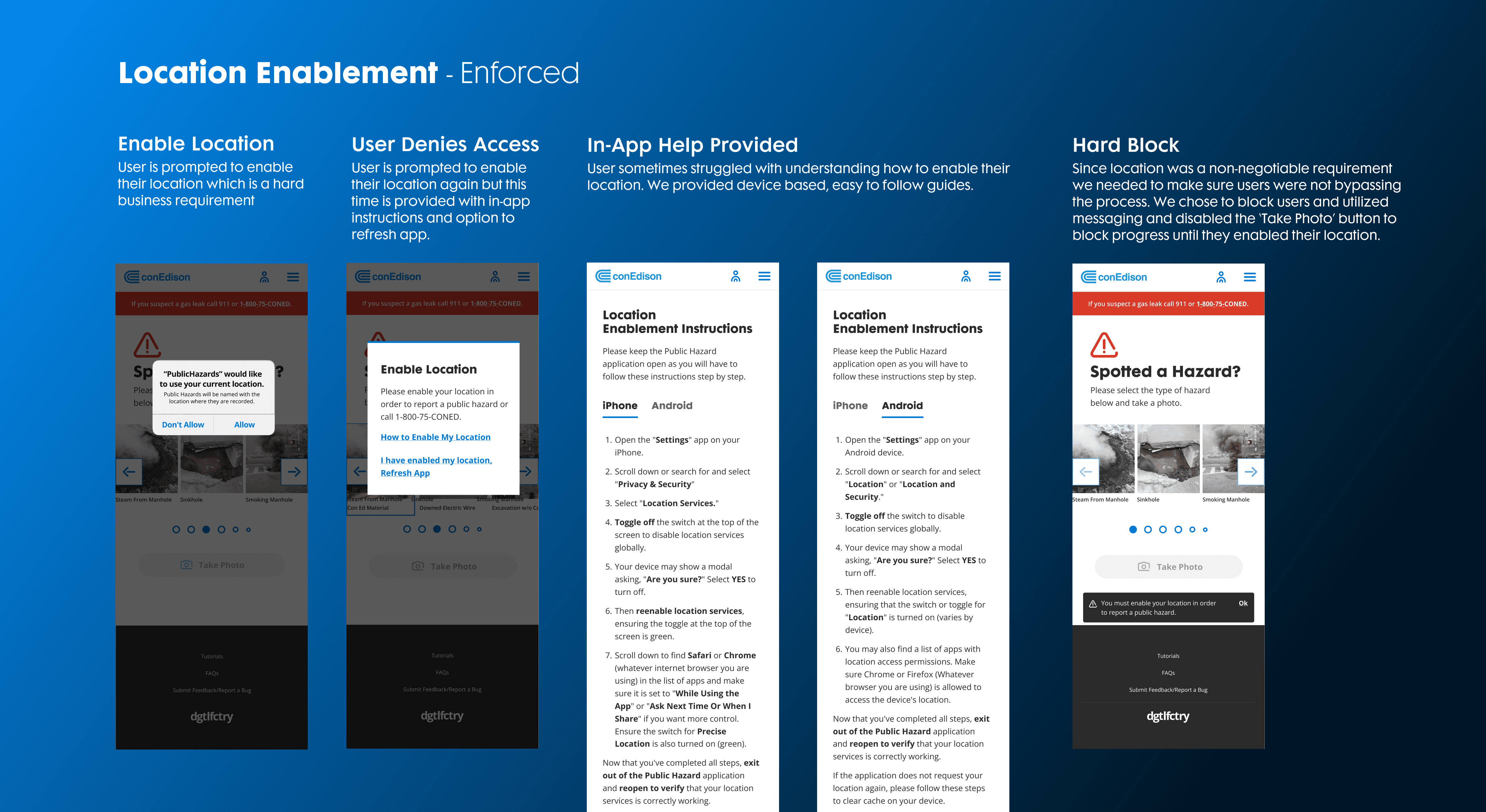
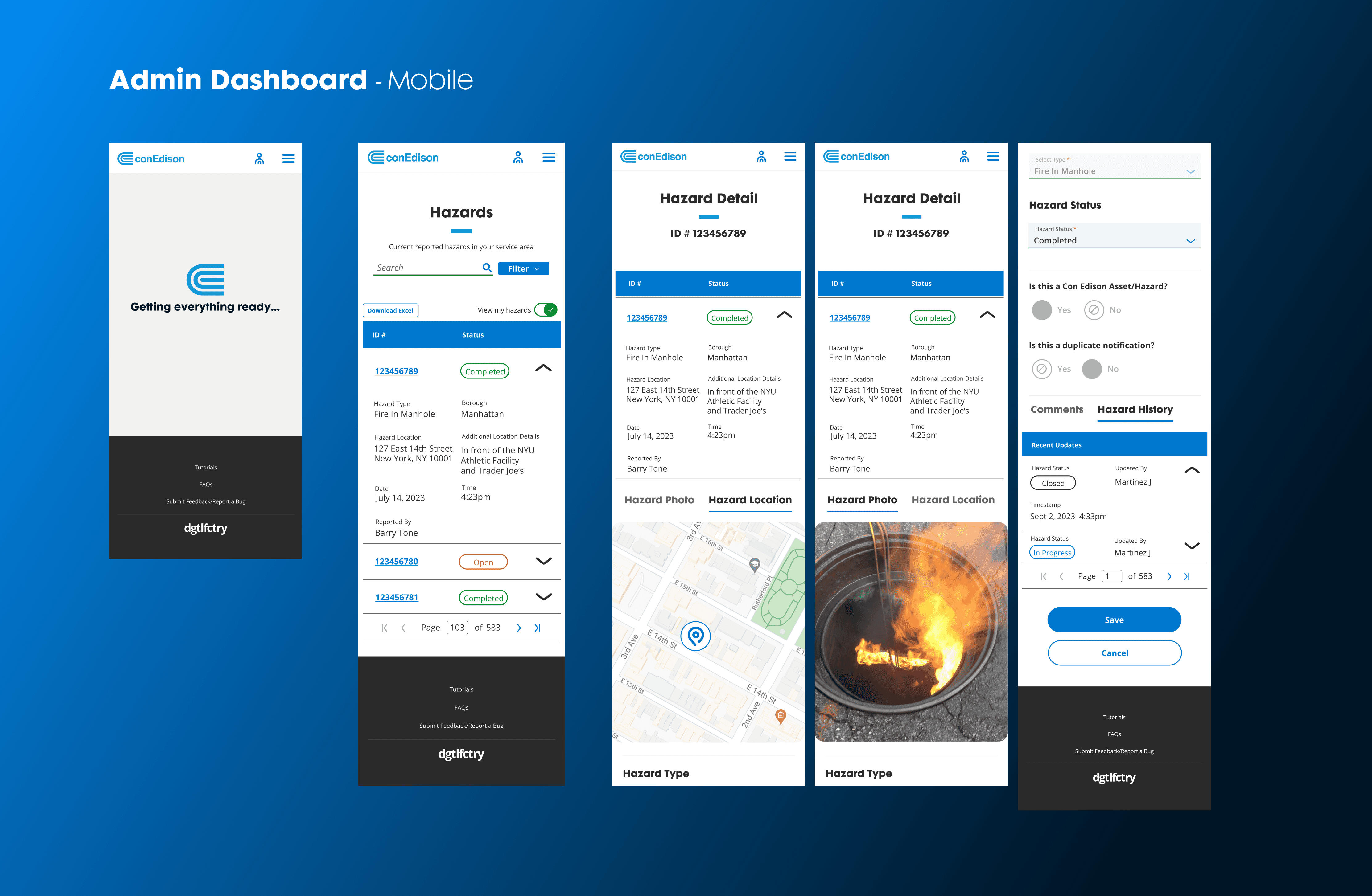
Admin Mobile Dashboard & Hazard Reporting
Initially, the admin experience was limited to hazard triage and desktop access. Operational leaders requested mobile visibility and the ability to contribute hazard reports during field visits. Partnering with Product and Engineering, I assessed business value, prioritized features with stakeholders, and extended the reporting flow for admin users without disrupting triage responsibilities. This included enabling mobile dashboard and reporting access, adding a discreet “Report a Hazard” entry in navigation, and coordinating backend updates. Close collaboration during QA ensured parity with desktop workflows. The outcome preserved workflow focus, closed a critical data gap, and created a reference pattern for future admin features.
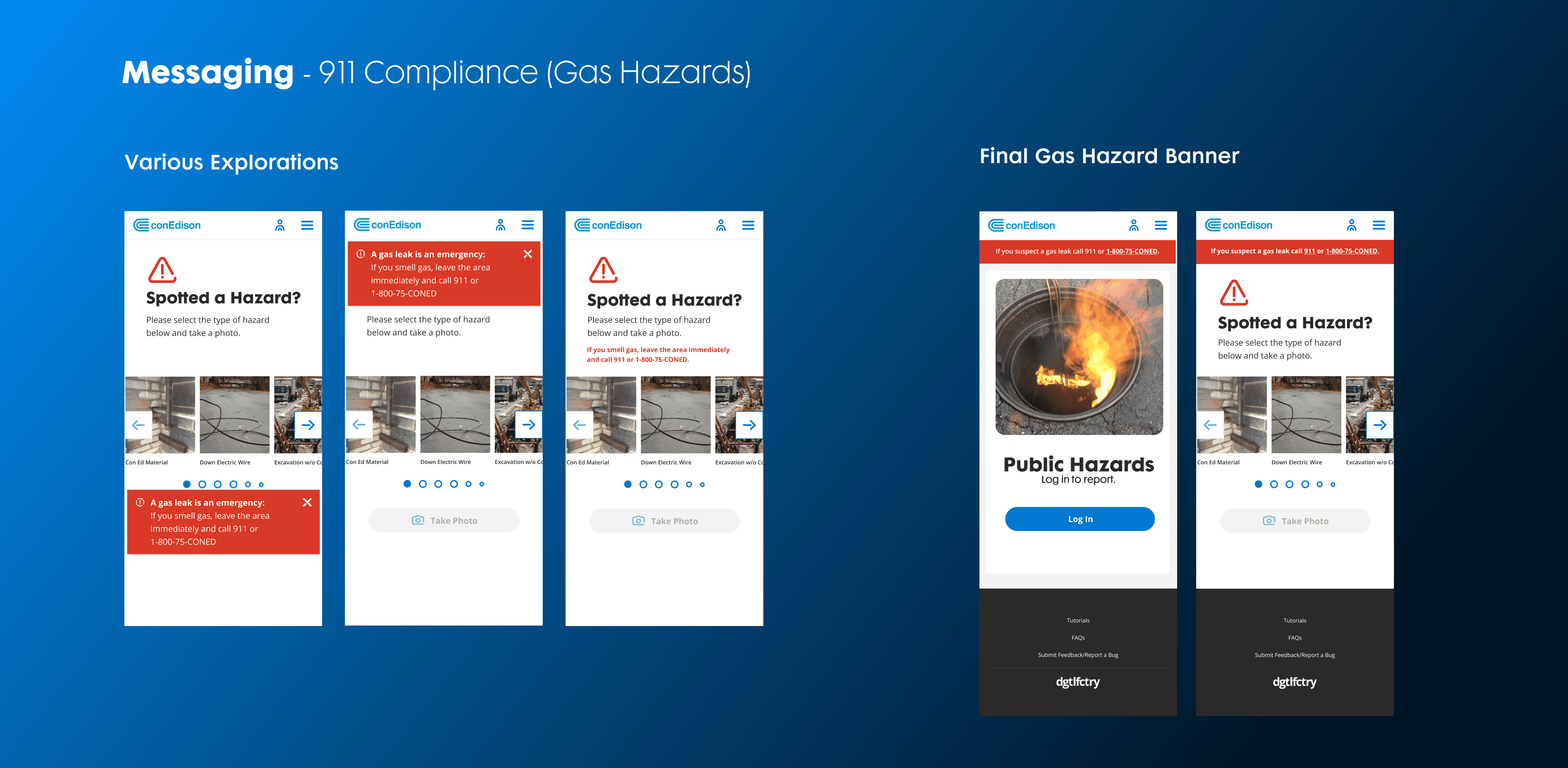
911 Compliance
A critical challenge was aligning the platform with emergency compliance requirements, particularly gas-related hazards that mandate a 911 call. There was concern that a unified app could unintentionally enable employees to bypass required safety protocols. Partnering with safety, compliance, product, and engineering, we resolved the tension through interaction design—triggering a non-dismissible 911 prompt when gas hazards were selected, with messaging co-authored for regulatory accuracy. This preserved mandatory safety workflows while maintaining a single, trusted platform across divisions.
Driving Cross-Division Adoption
Designing the product was only half the challenge—the organization had to trust and use it.
During usability testing, one concern surfaced repeatedly:
"This is a great app, but how will users know it exists?"
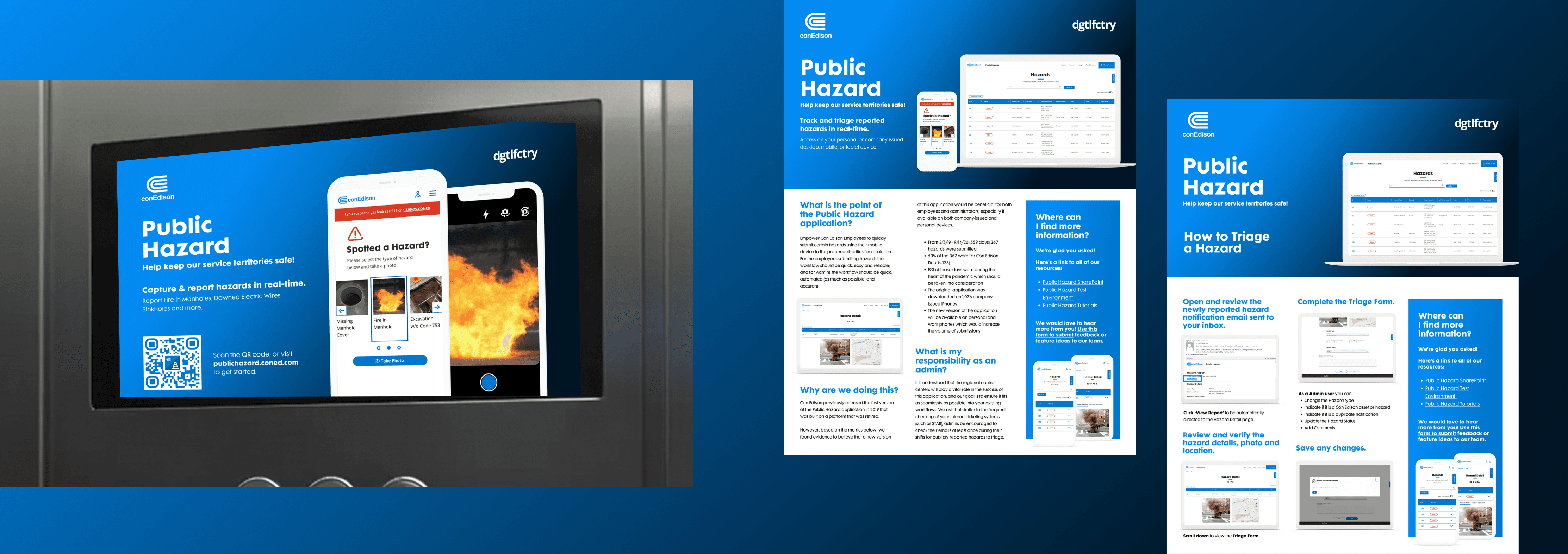
Previous internal tools had struggled with adoption, so I treated rollout as part of the product experience rather than a post-launch handoff.
I partnered with Product, Corporate Affairs, and Training on a coordinated launch across workplace communications, control centers, onboarding, and safety channels. We also used clear Digital Factory branding to signal that the platform was official, supported, and safe to use.
Result: 85–90% adoption across six operational divisions within the first two weeks.
Extending the Design System
Mobile-First Data Table
During usability testing, it became clear that the existing mobile data table pattern wasn’t providing users an optimal experience on mobile devices. The default approach required users to swipe horizontally through multiple columns to view details—slow, error-prone, and nearly impossible in the field.
I challenged this pattern and reimagined it for small screens. Drawing inspiration from accordion UI structures, I designed a mobile-first table with expandable rows that surfaced the most critical information upfront. Users could tap to reveal additional fields without horizontal scrolling, significantly improving speed and clarity.
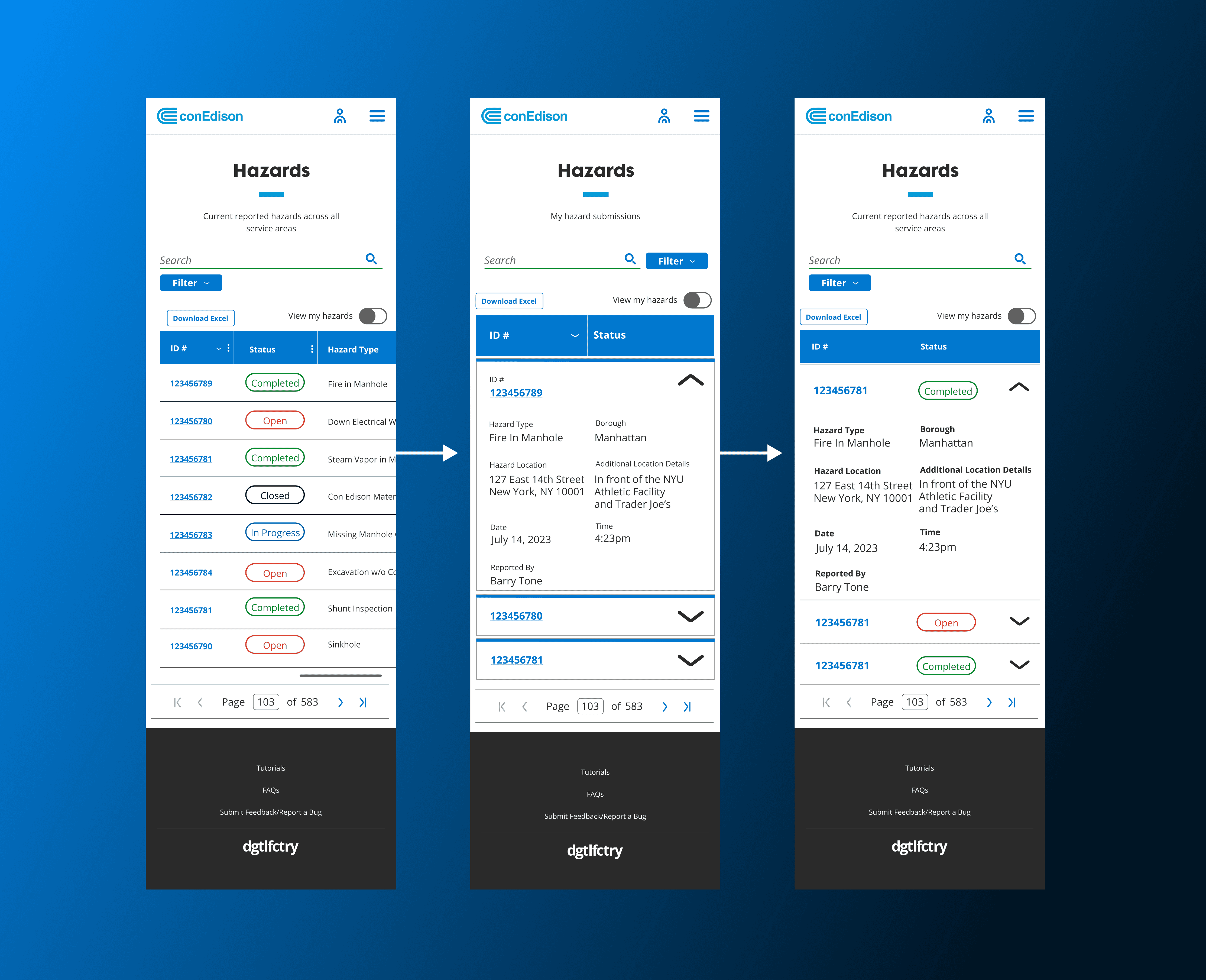
As Design System Lead on the Digital Factory team, I contributed the pattern back into the enterprise design system—allowing other product teams to adopt the solution and improve mobile usability across the ecosystem.
Image Carousel
Speed and accuracy were both non-negotiable for this citywide reporting experience—public safety depended on it. I led the exploration of interaction models for the “Select a Hazard” flow, pairing UI experiments with speed and usability testing to understand how quickly and confidently users could identify the hazard they were seeing in the real world.
I explored dropdowns and radio buttons first, but both introduced unnecessary friction and slowed users down in moments where every second mattered.
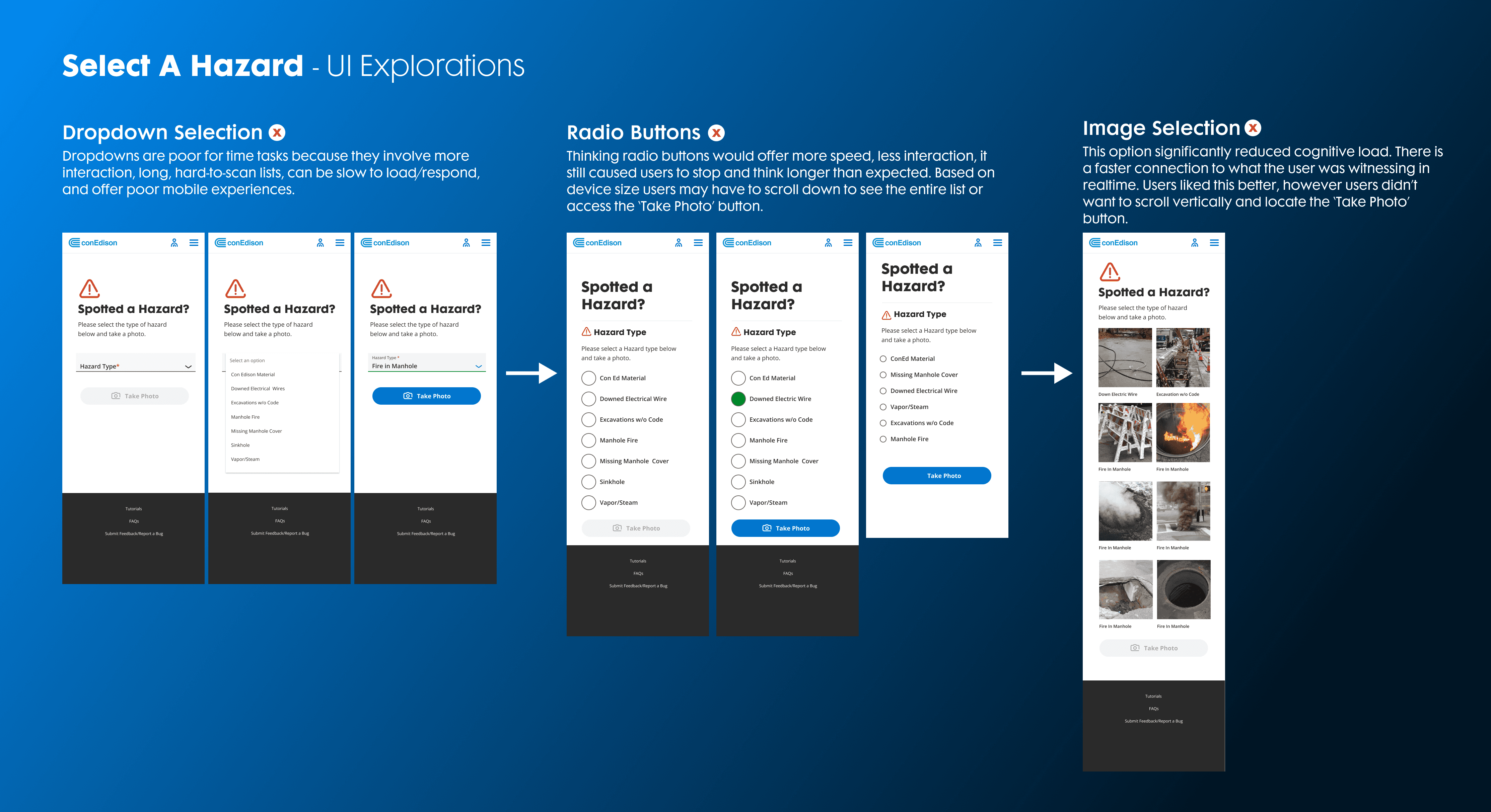
An image-based selection approach ultimately performed best, reducing cognitive load and helping users immediately connect what they were witnessing to the correct hazard type with minimal interaction.
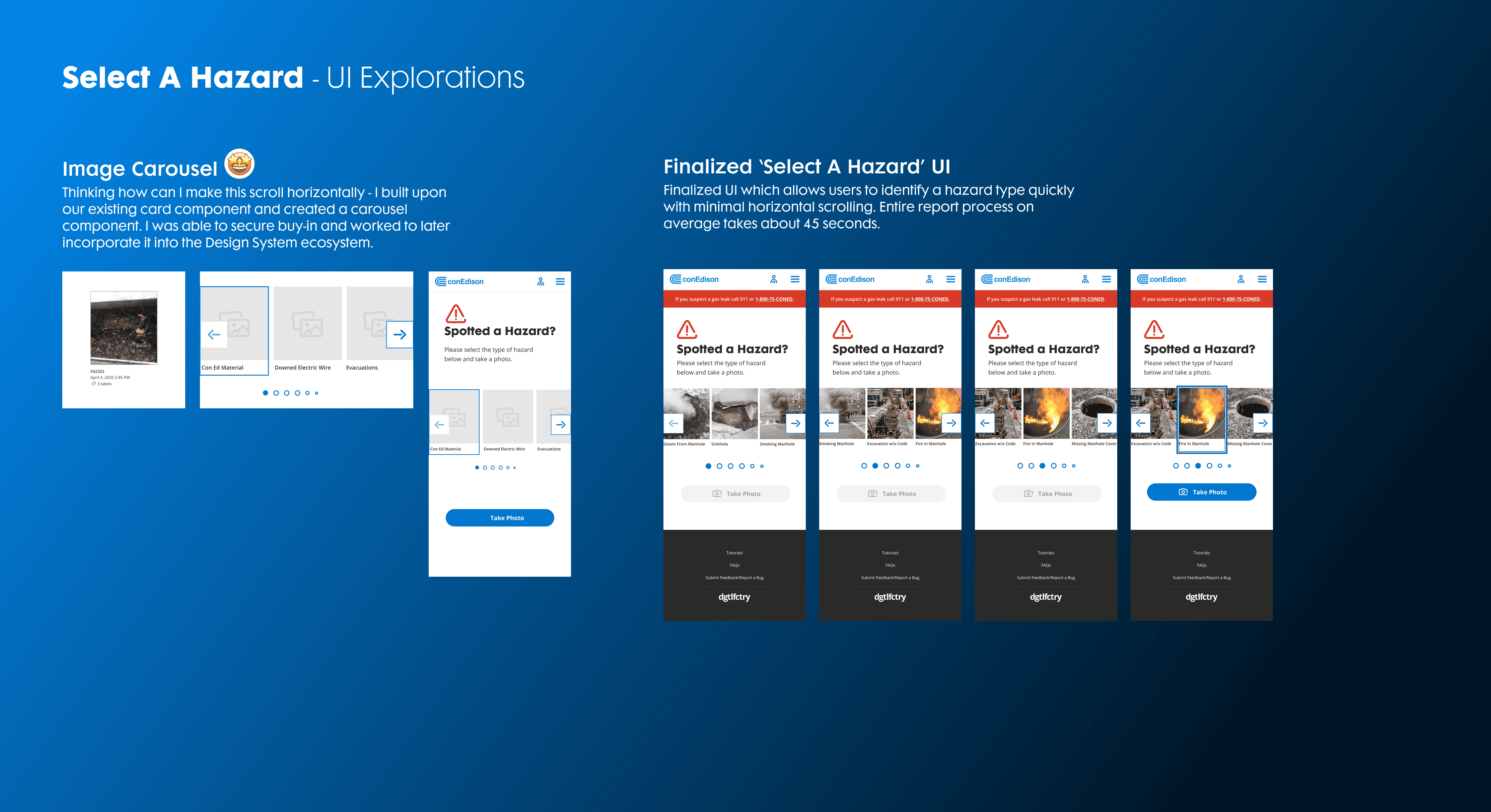
This work meaningfully reduced time-to-report while improving accuracy and user confidence. It also extended beyond this single flow—this exploration led to the creation of a new carousel component that was later incorporated into the design system, establishing a scalable pattern used across multiple applications.
What Changed Because This Shipped
Hazard reporting went from hours to under a minute.
Employees began reporting hazards more proactively, while leaders gained a shared data source for identifying patterns and managing operational risk.
The platform changed hazard reporting from a reactive hotline process into a digital workflow that could support broader visibility, routing, and prevention.
Phase 2
Following the MVP launch, I partnered with product leadership to define the long-term roadmap, focused on scaling impact and future-proofing the platform.
This included exploring AI and ML capabilities for automated hazard detection, voice-based reporting to support hands-free use in high-risk environments, and a customer-facing version to extend reporting to the public. We also planned features that allowed employees to track the status of reported hazards, incentive models to drive sustained adoption, and STAR system integration for automated ticket creation, tracking, and operational follow-through.
Extending the Platform with AI
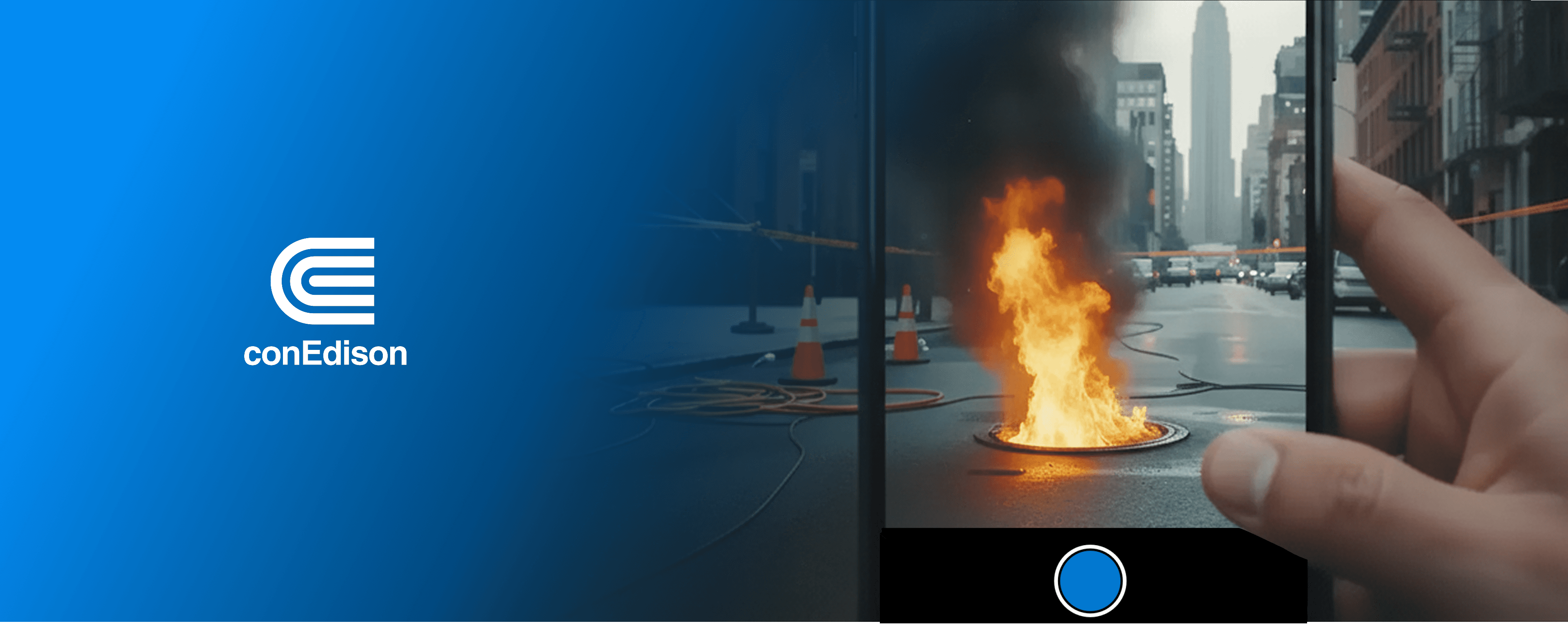
After the MVP launched, I worked with product leadership to explore how the platform could evolve beyond manual reporting.
The roadmap included ideas such as AI-assisted hazard identification, voice-based reporting for hands-free use, employee report tracking, automated ticketing, and a potential public-facing version of the experience.
One principle stayed consistent across those explorations: automation could reduce friction, but it should not replace human judgment in a safety-critical workflow.
That led to an early photo-first concept in which the system could analyze a captured image, suggest a likely hazard type, and keep the user responsible for review and confirmation.
In 2026, I revisited that idea independently and developed it into Hazard Intelligence, a functional prototype focused on confidence-aware recommendations, correction, fallback, and human control.
Explore Hazard Intelligence →
Why This Matters
AI isn’t introduced for novelty—it directly addresses real problems observed across thousands of hazard reports:
Employees operate in noisy, high-stress environments
Faster reporting materially impacts safety and response time
Manual inputs introduce inconsistency and error
GPS permissions are unreliable in the field
Compliance teams require transparency and traceability
Phase 2 builds on what’s already working, while deliberately removing the friction points uncovered through real-world use—without compromising trust, accountability, or safety.
Credits
Design Lead: Amanda Whelen
Product Owner: Nawang Jimba
Analysts: Grace Lee, Alana Hamm
Tech Leads: Babu Chellathurai, Wilson Rivera
Developers: Arnob Hridoy, Prasad Vemula, Keith Zane, Rajaprakash Ramanathan